
The Complete Guide for Local Businesses
Google Business Profile is the listing that controls how your business appears in Google Maps and Google Search when someone in your area searches for what you offer.
It is the profile that shows your business name, address, phone number, hours, photos, and customer reviews. It is what prospective customers evaluate before deciding whether to call you. And it is what Google’s algorithm evaluates when deciding whether to show your business at the top of local search results.
If you have ever searched for a type of business on Google Maps and seen a set of three results appear in a box above the organic results that is the Local 3-Pack, and every business in it is there because of their Google Business Profile.
This guide explains what GBP is, how it fits into Google’s local search system, and why it is the most important local marketing asset any local business has access to.
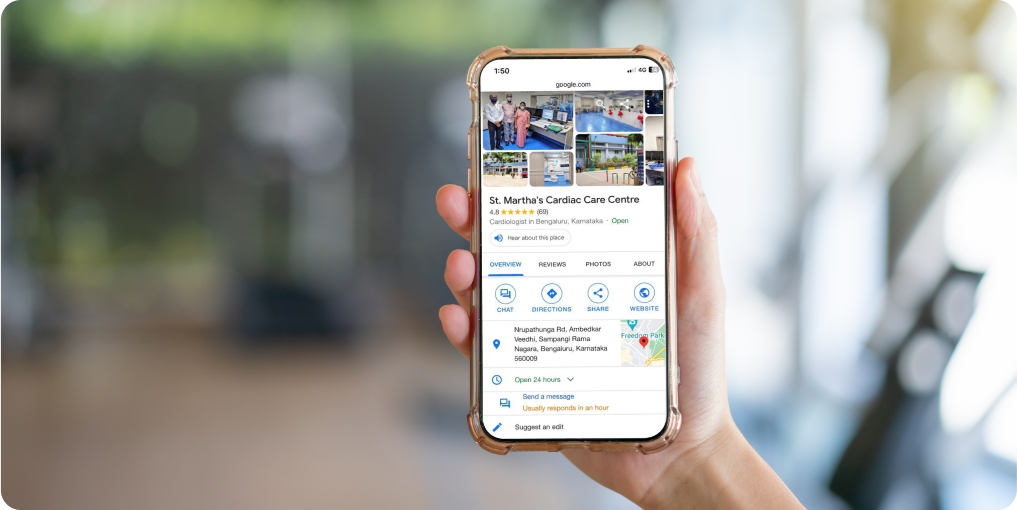
Google Business Profile (GBP) is a platform operated by Google that allows businesses to create and manage a public listing on Google Maps and Google Search.
Every business listing you have ever seen in Google Maps the red pin, the profile with photos and reviews, the box with opening hours is a Google Business Profile.
GBP was previously known as Google My Business (GMB), which is why you will still see the older name used throughout the local SEO industry. Google rebranded the product to Google Business Profile in late 2021.
The underlying platform and its function did not change with the rebrand the name did.
Who can create a GBP listing
Any business that operates from a physical location or serves customers within a defined geographic area can create a GBP listing. Restaurants, shops, offices, clinics, and any other business that customers visit in person can display a physical address on their listing.
Tradespeople, delivery businesses, and other service businesses that travel to customers rather than receiving them at a fixed location can create a listing without displaying an address, using the Service Area Business configuration instead.
A business does not need a website, a social media presence, or any other form of digital marketing activity to create and manage a GBP listing. The profile itself contains enough information for customers to find and contact a business directly from Google Maps.
What GBP costs
Creating and managing a Google Business Profile has no cost. Google provides the platform, the listing, the Map Pack placement mechanism, and the review infrastructure at no charge to businesses.
There is no paid tier of GBP that produces better organic Map Pack rankings the placement algorithm evaluates profile quality and engagement signals, not payment.
The only paid local product Google offers in this space is Local Services Ads, which is a separate advertising product that appears above the Map Pack in certain categories and requires a separate application and cost structure.
Once Your Profile Is Live, See How It Compares
GMB Crush maps your Map Pack ranking across your area and audits your profile against the businesses already in the top three so you know exactly where you stand and what to improve first.
To understand why GBP matters so much, it helps to understand where it sits within the broader local search experience that Google delivers.
When someone searches for a local business or service on Google, the results they see are assembled from several sources, and GBP data is central to the most prominent of them.
The Local 3-Pack
The Local 3-Pack, also called the Map Pack, is the set of three business listings that appears at the top of Google search results for queries with local intent.
It appears before organic search results and after any paid ads. The three businesses in the Local 3-Pack are the ones Google has determined are the most relevant, closest, and most credible matches for the specific query from the specific searcher’s location.
Appearing in the Local 3-Pack is one of the highest-value positions in digital marketing for local businesses, because it captures the attention of customers who have already decided they need the type of business being searched for and are actively choosing between options.
The Local 3-Pack receives the majority of clicks for local service searches. Every business in it got there through its Google Business Profile.
Google Maps
Google Maps is the application most people use to search for and navigate to local businesses. All GBP listings appear on Google Maps.
When someone opens Google Maps and searches for a business type in their area, the results they see are the GBP listings that Google has determined match their query.
Your GBP profile controls what information Google Maps shows about your business, including the pin location, the opening hours, the photos, the contact details, and the reviews.
Google Search knowledge panels
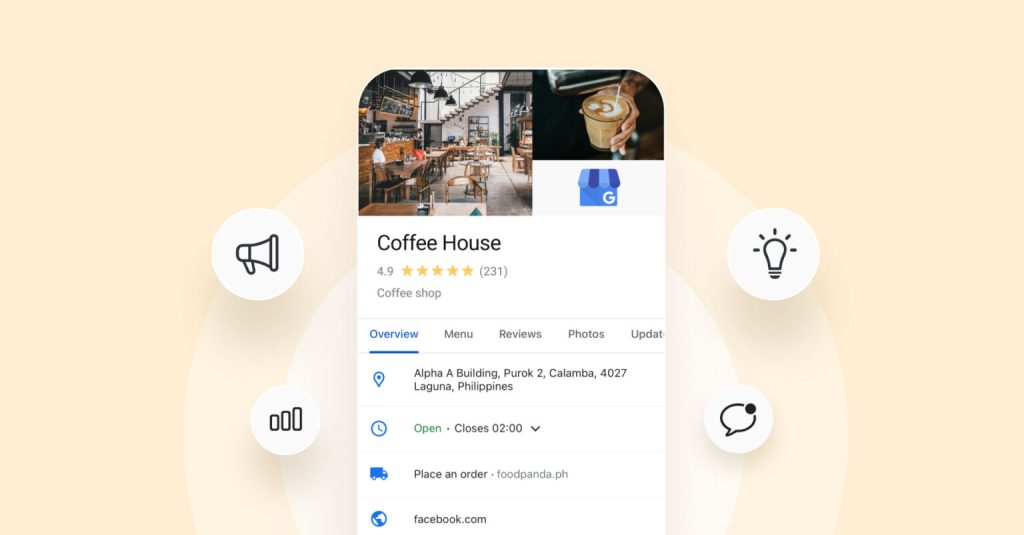
When someone searches directly for a specific business name on Google Search, a knowledge panel appears on the right side of the results page (on desktop) or above the results (on mobile) showing your GBP data: name, address, phone, hours, photos, and reviews.
This knowledge panel draws its data from your GBP profile. If your profile has incorrect information, outdated photos, or missing details, that is what prospective customers see in the knowledge panel when they search specifically for your business.
Your Competitors Are Already Using GMB Crush
GBP audits, geo-grid ranking maps, competitor analysis, review monitoring, and AI Overview insights. All in one platform. Start your 14-day trial today.
- What Your GBP Profile Contains
A GBP profile has a structured set of fields, some of which are required for the listing to function and others which are optional but contribute significantly to ranking performance and customer conversion. Understanding what each section does and why it matters is the foundation of any profile optimisation effort.
Core identity fields
- Business name: your exact legal or commonly used trading name, entered without keyword additions or promotional language
- Category: the classification of your business type, which is the most important single ranking signal on the profile more on this below
- Address: your physical address if you have a customer-facing location, or your service area configuration if you travel to customers
- Phone number: a direct contact number that is answered during all listed hours
- Website: the URL of your business website
- Hours: your opening hours for each day of the week, plus Special Hours for holidays and exceptions
Content fields
- Business description: a 750-character text field where you describe your primary services, location coverage, and what distinguishes your business indexed by Google as keyword content
- Services menu: a structured list of every service or product you offer, with names and optional descriptions each entry indexed separately as a keyword signal
- Photos: the images that appear on your profile, processed by Google’s AI systems to generate visual relevance signals
- GBP posts: regular updates, offers, and events that you publish on your profile, contributing to the active management signal Google evaluates in rankings
Customer interaction fields
- Reviews: customer-written assessments of your business that are publicly visible and contribute to your Prominence ranking signal
- Q&A: a customer-facing question and answer section where anyone can ask questions about your business and you or other customers can answer them
- Messaging: a direct messaging function (where enabled) allowing customers to contact you through the GBP interface
- Booking links: links to your scheduling or reservation system, allowing customers to book directly from your GBP profile
Google evaluates GBP listings against three signals to determine Map Pack ranking: Relevance, Distance, and Prominence.
Each signal draws from different aspects of your profile and your broader online presence.
Relevance: are you the right match?
Relevance is how well your profile matches the intent of a specific search query. It is primarily determined by your primary category the classification you choose that tells Google what type of business you are.
A business with ‘Italian Restaurant’ as its primary category is a more relevant candidate for ‘Italian restaurant near me’ searches than a business with the generic ‘Restaurant’ category.
Your secondary categories, services menu entries, and business description all contribute additional Relevance signals for more specific query types.
Distance: how close are you?
Distance is the geographic proximity between your listing and the location of the person conducting the search.
Google calculates this dynamically for every search based on where the searcher is located, not where your business is.
A business that ranks first for searches from directly outside its premises may rank lower for the same search from a kilometre away.
The Distance signal is calculated from your registered address or your service area centroid for service area businesses.
Prominence: how well-known and trusted are you?
Prominence is Google’s assessment of how established, credible, and well-regarded your business is. It is built from your review count and star rating, the consistency of your profile activity (posts, photos, responses), the completeness of your profile information, your website’s authority, and the consistency of your business information across external directories and citation sources.
Prominence is the signal that responds most directly to ongoing profile management a business that consistently builds reviews, maintains its profile, and posts regularly will see Prominence improve over time.
The key factor is this: your Google Business Profile is not a directory entry that you create once. It is a managed asset that Google continuously evaluates against the profiles of every competitor in your area. The businesses that hold the top Map Pack positions have built stronger Relevance, Distance, and Prominence signals than the businesses below them and they maintain those signals through ongoing profile management.
- GBP Has Evolved: From GMB to Today
Google Business Profile has been through several significant evolutions since it launched, and the platform available today is substantially more capable than earlier versions.
Understanding this history helps explain why you may see older guides or tutorials referencing features, processes, or names that no longer apply.
The naming history
The platform launched as Google Places, evolved into Google+ Local, became Google My Business (GMB) in 2014, and was rebranded to Google Business Profile in 2021.
The core function a business profile that appears in Google Maps and local search results has been consistent throughout, but the interface, features, and management experience have changed substantially with each iteration.
The retirement of the standalone Google My Business app in 2022 moved all management functions to Google Maps and the business.google.com dashboard.
The management interface today
GBP is managed through two primary interfaces: Google Search (searching your business name while signed in shows a management panel above the results) and business.google.com (the direct web interface for profile management). The retired GMB app and Google+ are no longer relevant.
Any guide that references managing your listing through the GMB app or Google+ pages is describing a workflow that no longer exists in that form.
See Where You Rank Across Your Full Service Area
A GBP profile is the foundation. GMB Crush’s geo-grid shows how well it is performing your Map Pack position at every point across your area, not just at your own address.
The most significant recent development in Google Business Profile’s role in local search is its integration with Google’s AI-driven result formats.
AI Overviews and the AI Pack are increasingly appearing for local queries, and they draw their content from GBP data in ways that change what a well-optimised profile needs to contain.
How AI formats use GBP data
When Google’s AI generates a response to a local service query ‘best dentist near me,’ ‘plumber available today,’ ‘Italian restaurant with outdoor seating’ it draws from the structured data on GBP profiles to identify candidate businesses and generate business summaries.
Profiles with specific service descriptions, complete attribute configurations, and rich review content with specific service mentions give the AI enough structured data to include the business in an AI-generated recommendation.
Profiles with thin content, missing categories, or generic descriptions are excluded from AI-generated results regardless of their traditional Map Pack position.
This means that the quality bar for appearing in the most prominent local result formats has risen. A profile that was adequate for traditional Map Pack ranking may not be adequate for AI Pack inclusion.
The investment required to appear well in AI-generated local results is the same investment as optimising a strong GBP profile just with higher content specificity requirements.
Recommended Reading
Google Maps for Businesses: the step-by-step guide to claiming, verifying, and setting up your GBP profile
- GMB Crush Takeaways
Google Business Profile is the listing that determines whether your business appears when local customers search for what you offer. It is the most important local marketing asset a local business has.
Here is the essential summary:
- GBP is what appears in Google Maps and the Local 3-Pack when someone searches for your type of business near them. It shows your name, address, hours, photos, and reviews the information customers use to decide whether to contact you.
- There is no cost to create or manage a GBP listing. Google provides the platform at no charge. Map Pack ranking is earned through profile quality and engagement, not purchased.
- Google ranks GBP listings using three signals: Relevance (how well your profile matches a search query), Distance (how close you are to the searcher), and Prominence (how established and credible your profile appears). All three are influenced by your profile decisions.
- The platform was previously called Google My Business. The current name is Google Business Profile, and it is managed through Google Search (while signed in) or business.google.com. The retired Google My Business app no longer exists.
- AI-driven result formats including AI Overviews and the AI Pack are increasingly appearing for local queries, and they require deeper, more specific profile content than traditional Map Pack ranking. The same profile optimisation principles apply, but with a higher bar for content specificity.
Your Google Business Profile is running right now, in your local market, every time someone searches for a business like yours.
If it is well-maintained, it is directing customers to you. If it is incomplete, outdated, or poorly configured, it is directing them to competitors whose profiles are doing the job yours should be.
The investment required to build and maintain a strong profile is modest. The return on that investment, measured in customer enquiries, compounds for as long as your business operates.
One Platform. Every Local Ranking Signal.
Audit, optimise, track, and outrank. GMB Crush gives businesses and agencies everything needed to build and grow a Google Business Profile presence. 14-day trial, no credit card required.