
The Rules, the Risks, and the Right Way
Changing your business name on your Google Business Profile sounds straightforward. You go to your profile, edit the name field, save the change, and you are done.
Except that is not always what happens. Google subjects name changes on GBP listings to an automated review process, and a change that violates the name policy — or that looks like it might — can trigger a suspension of your entire listing while the review is pending.
This guide covers how to change your GBP business name correctly, what Google’s name policy actually requires, which changes go through without review and which trigger the review process, and what to do if your name change is rejected or your listing gets suspended because of it.
The process for changing your business name on Google Business Profile is simple when the change is legitimate and straightforward.
Here is the step-by-step process.
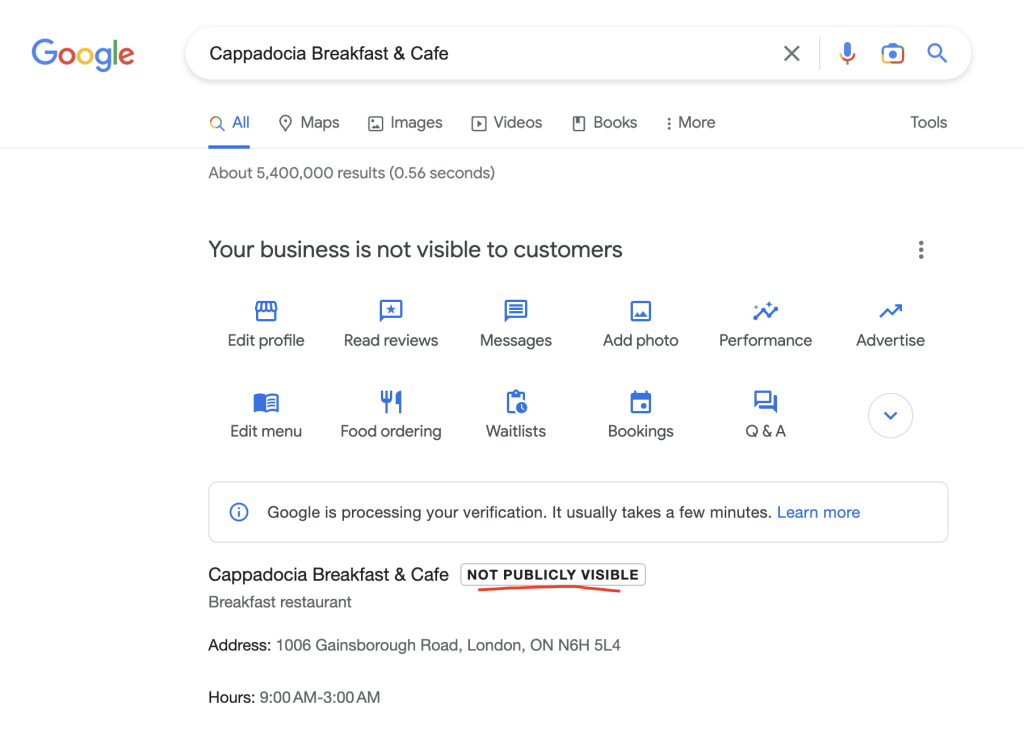
Step-by-step: changing your name via Google Search
- Sign in to the Google account that manages your GBP listing.
- Search your business name in Google. Your Business Profile management panel should appear on the right side of the results page or above the results on mobile.
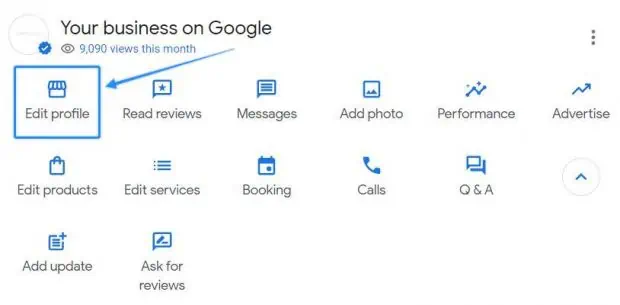
- Click ‘Edit profile’ to open the profile editor.
- Select the ‘Business name’ field and make your change.
- Click ‘Save.’
For most straightforward name corrections — correcting a spelling error, updating a capitalisation, removing a punctuation inconsistency — the change will apply almost immediately without triggering a review process.
Step-by-step: changing your name via the GBP dashboard
- Go to business.google.com and sign in.
- Select the listing you want to edit from your business list.
- Click ‘Edit profile’ or navigate to ‘Business information.’
- Find the ‘Business name’ field and make your change.
- Click ‘Save’ or ‘Apply.’
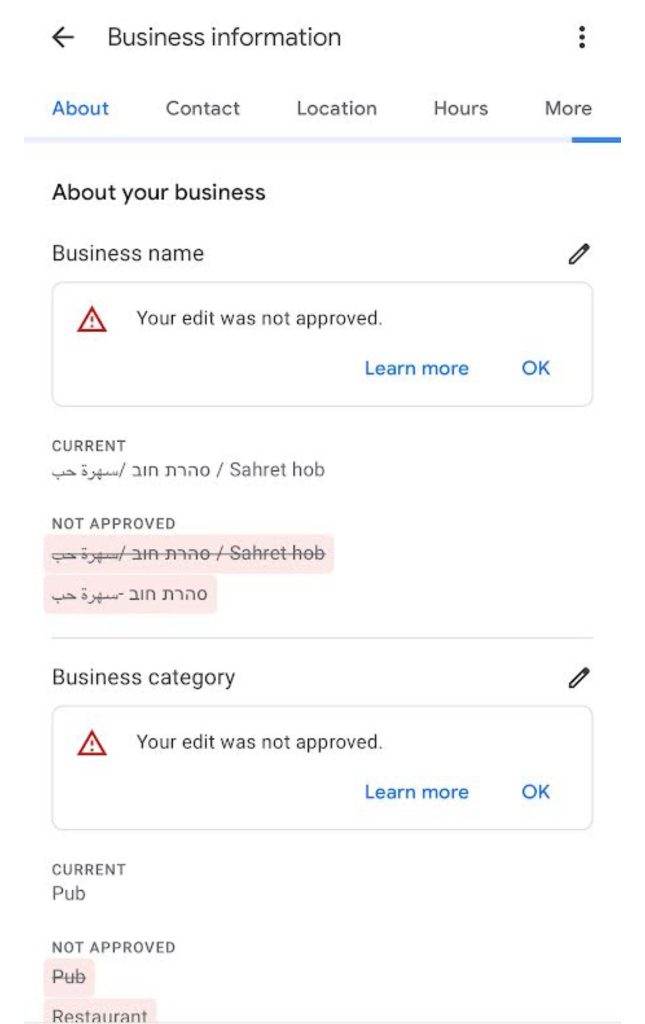
Google may display a notice that your change is under review. This is common for name changes that involve significant alterations — adding or removing words, changing the business structure, or any edit that departs substantially from the existing name.
During the review period, your previous name remains live on your profile.
How long does a name change take?
Simple corrections typically apply within minutes to a few hours. Name changes that trigger a review process can take anywhere from 24 hours to several weeks depending on the nature of the change and whether human review is required.
If a review has been pending for more than two weeks with no resolution, contacting Google Business Profile support with documentation supporting the name change is the appropriate next step.
Audit Your GBP Against the Top 3 in Your Market
GMB Crush compares your full profile — including your name, categories, and completeness — against the businesses already outranking you. See the exact gaps driving the difference.
Google’s name policy for Google Business Profile is one of the most consistently misunderstood elements of local SEO.
Understanding exactly what the policy permits and prohibits removes the guesswork from every name decision.
The core rule: your real-world name, nothing more
Google’s policy is direct: your business name on GBP should reflect the name of your business as it is used in the real world and as it appears on your signage, your website, and your legal registration.
This is the complete rule. Everything else in the name policy flows from it.
If your business is called ‘Smith Plumbing Ltd’ — that is what your name should be on GBP. Not ‘Smith Plumbing Ltd | Emergency Plumber Manchester,’ not ‘Smith Plumbing Emergency Drain Unblocking London,’ not ‘Smith Plumbing Ltd (Fast Response Available).’ Your legal or commonly used trading name, exactly as it appears in the real world.
What is explicitly not allowed
- Adding service keywords that are not part of your legal or trading name: ‘Emergency Plumber’ after a plumbing company name, ‘Best Dentist’ before a dental practice name, or any service descriptor that does not appear on your actual signage.
- Adding location keywords that are not part of your legal name: ‘London,’ ‘Manchester,’ ‘Near Me’ appended to a business name are all violations unless the location genuinely forms part of the business’s trading name.
- Adding promotional language: ‘Award Winning,’ ‘#1 Rated,’ ‘Trusted,’ or similar claims are not permitted in the name field regardless of whether they are true.
- Adding contact information: phone numbers, websites, or email addresses in the name field are not permitted.
- Duplicate keyword descriptors: if your business type is already reflected in your name (e.g., ‘Manchester Dental Practice’), adding your category again in a keyword form is redundant and policy-violating.
What is permitted
- Your complete legal trading name including any legal suffix: Ltd, LLC, Inc, PLC, GmbH, and similar legal identifiers are part of your business name and should be included if that is how your business is formally known.
- Abbreviated versions of your name if that is how your business is commonly known: if your business is formally ‘Johnson and Associates Solicitors Limited’ but is universally known and operated as ‘Johnson Associates,’ the commonly used name is the correct one to use.
- Location as part of a genuine trading name: if your business is actually called ‘Manchester Roofing Company’ and that is its real-world name, the location is a legitimate part of the name. The test is whether you would answer your phone or sign your invoices with that name.
- What Triggers a Review or Suspension
Not all name changes are treated equally by Google’s automated systems.
Understanding what specifically triggers a review — or worse, an immediate suspension — allows you to anticipate the risk before making a change.
Changes that typically go through without review
- Minor corrections to spelling, capitalisation, or punctuation in a name that is otherwise unchanged
- Adding or removing a legal suffix (Ltd, Inc) where the rest of the name is identical
- Correcting a name that was entered incorrectly at initial setup to match the genuine trading name
Changes that typically trigger automated review
- Adding words to a name that did not previously contain them — particularly if those words are service or location keywords
- Significantly shortening or lengthening a business name
- Changing a name to something entirely different from the current listing — common in acquisitions and rebrands
- Any name change on a listing that already has a history of policy violations or previous review processes
During the review period for any of these changes, your previous name remains live and your profile continues to rank.
The review process is evaluating whether the new name complies with the name policy, not whether your business is legitimate.
Having documentation ready — your business registration, website header screenshot, or physical signage photo showing the name you are requesting — can significantly speed up a review if human review is required.
Changes that can trigger an immediate suspension
The name change most likely to cause an immediate suspension is one that adds keywords clearly not related to the business’s actual name.
‘Smith Plumbing’ changing to ‘Smith Emergency Plumbing London Fast Response’ triggers every automated keyword stuffing signal simultaneously.
The listing may be suspended immediately rather than placed in a slower review queue.
A suspended listing means zero Map Pack visibility for the duration of the suspension.
The correct sequence is always: make only policy-compliant name changes, and if you believe a keyword-containing phrase is genuinely your trading name, have documentation ready before making the change.
The single most important rule for name changes: make only one significant edit to your profile at a time. Changing your name and your address and your primary category simultaneously signals multiple major changes at once, which is far more likely to trigger an automated suspension than any single change would be alone.
Your Competitors Are Already Using GMB Crush
GBP audits, geo-grid ranking maps, competitor category analysis, review monitoring, and AI Overview insights. All in one platform. Start your 14-day trial today.
- Legitimate Name Changes: Rebrands and Acquisitions
There are entirely legitimate business reasons to change your GBP name that go beyond correcting a typo.
A business rebrand, an acquisition, a change of ownership, or a trading name update all require a name change that is more significant than a minor correction.
These scenarios carry a higher risk of review and require more careful handling.
Business rebrand
When a business changes its trading name — a common scenario for growing businesses repositioning in their market — the GBP name should be updated to reflect the new name as soon as the rebrand is live in the real world.
The update should coincide with or follow the real-world change, not precede it.
Google’s name policy requires that GBP names match real-world usage, so changing your GBP name before your website, signage, and correspondence have been updated to reflect the new name creates an inconsistency that may trigger rejection.
Update your name across your website, your signage, and your major citation sources as close to simultaneously as possible, and update your GBP name once those real-world changes are live.
Have your new brand assets — website header, business registration if the legal name changed, or photographs of new signage — ready to submit if Google’s review process requires documentation.
Acquisition and ownership change
When a business is acquired and the new owner wants to update the GBP listing to reflect the new trading identity, the name change should reflect the new trading name exactly.
The previous owner’s listing should not simply have its name changed to a new brand if the business has genuinely changed hands — a change of ownership may require claiming or transferring the listing rather than just editing the name field.
If you have acquired a business and inherited its GBP listing, request a transfer of ownership through the GBP support process rather than making unauthorised edits to a listing you do not have legitimate management access to.
Operating an inherited listing without proper ownership transfer creates a compliance vulnerability that can result in the listing being reclaimed or removed.
Multiple locations with different names
For businesses that operate multiple locations under different trading names — a common scenario for hospitality and retail groups — each location should have its own GBP listing with its correct, individual trading name.
Do not use a parent company name across all locations if the individual outlets trade under distinct names.
Customers searching for the individual location name will not find a listing that uses only the parent company name, and Google’s entity system evaluates each location as a distinct business.
Keyword stuffing in GBP business names — adding service or location terms to a name field that Google policy prohibits — is one of the most persistently debated tactics in local SEO.
The debate exists because the practice sometimes appears to produce short-term ranking gains, which creates the misleading impression that the risk is manageable. Here is the honest analysis.
Does keyword stuffing in the name field affect ranking?
There is evidence that keyword inclusion in a GBP name has historically influenced ranking for the keyword terms added. Google’s name field is indexed as a relevance signal.
A business that adds ‘Emergency Plumber’ to its name may see improved ranking for ’emergency plumber’ searches for a period after the change. This is the observation that drives the practice.
What the short-term observation misses: Google’s systems are increasingly effective at detecting keyword stuffing.
The listing is subject to automated review, competitor reporting, and periodic auditing by Google’s quality systems.
The ranking benefit exists in the window between adding the keyword and Google taking action. That window is unpredictable — it may be weeks, it may be months, it may close with an immediate suspension. T
he downside risk, a full listing suspension that removes all Map Pack visibility, is asymmetric to the upside of a temporary keyword ranking boost.
Why compliant optimisation produces better long-term results
The businesses that rank consistently at the top of the Map Pack in competitive markets for high-value keyword terms are almost never doing so through keyword-stuffed names.
They rank because their category configuration is precise, their review velocity is strong, their profile is complete, and their entity coherence across GBP and website is robust.
These are the Relevance and Prominence signals that produce durable, stable Map Pack positions.
A business that ranks through keyword stuffing holds a fragile position. Any competitor report, any Google quality audit, any algorithm update targeting name policy violations removes that position without warning.
A business that ranks through compliant optimisation holds a position that its competitors cannot undermine simply by clicking ‘Suggest an edit’ on the listing.
What to do if your competitors are keyword stuffing
If businesses in your market are using keyword-stuffed names and ranking above you because of it, the correct response is to report the violation through the ‘Suggest an edit’ function on their listing and to focus your own optimisation on the compliant signals that produce durable results.
GMB Crush’s competitor audit shows you the full profile configuration of the businesses outranking you, including their name format — giving you the data to understand whether their position is built on a compliant foundation or a policy-violating one that is vulnerable to reporting.
Stop Optimising Without Competitor Data
GMB Crush shows you the exact name format, categories, review velocity, and profile configuration of the businesses outranking you — so every decision is based on what actually works in your market.
Recommended Reading
GBP Optimization: the complete 14-step guide to ranking signals — including the correct name field strategy
- If Your Name Change Is Rejected or Pending
A rejected name change or a long-pending review is frustrating, but both have a defined resolution path.
The specific approach depends on why the rejection occurred.
If the change is pending review for more than two weeks
Contact Google Business Profile support through the support option in your GBP dashboard.
Provide the specific listing affected, the name change you made, and the documentation supporting it — your business registration, website header screenshot, or a photograph of your physical signage showing the name you are requesting.
A support case with documentation is significantly more likely to be resolved quickly than a change left in the review queue without follow-up.
If the name change was rejected
A rejected name change means Google’s review determined the requested name does not comply with the name policy. Before appealing, review your requested name against Google’s policy honestly.
If the name you requested genuinely violates the policy — it contains keywords not in your trading name, or promotional language, or location descriptors your business does not actually use — the rejection is correct and the fix is to resubmit with your actual compliant name.
If you believe the rejection is incorrect — if the name you requested is genuinely your trading name as used in the real world — you can appeal through the GBP support process with documentation demonstrating real-world usage of that name.
A business registration document, a lease agreement, a photograph of your signage, or a screenshot of your website showing the name are all appropriate supporting documentation.
If your listing was suspended following a name change
A suspension triggered by a name change follows the same reinstatement process as any other GBP suspension.
Correct the name to your compliant trading name first, then submit a reinstatement request through business.google.com/reinstatement with documentation confirming your business identity and correct address.
Submit once with complete documentation rather than multiple incomplete appeals — a well-documented single appeal resolves faster than repeated undocumented submissions.
- GMB Crush Takeaways
Your GBP business name is your most protected brand asset on Google.
It should match your real-world trading name exactly and should never be used as a keyword placement field.
Here is the practical guidance:
- Change your name via Google Search or business.google.com using the Edit profile interface. Simple corrections apply quickly. Significant changes trigger a review. Make one change at a time — not name plus address plus category simultaneously.
- Your name must match your real-world trading name. The test is simple: does this name appear on your signage, your website, and your business correspondence? If yes, it is your correct GBP name. If you added it specifically for SEO purposes and it does not appear in your real-world operations, it violates the name policy.
- For rebrands and acquisitions, update your real-world identity first — website, signage, correspondence — then update your GBP name to match. Have documentation of the new trading name ready before making the change in case Google’s review process requires it.
- Do not keyword stuff your name. The short-term ranking benefit is real but fragile. A competitor report or Google quality audit can remove the position without warning and trigger a suspension. Compliant optimisation through category precision, review velocity, and profile completeness produces more durable results.
- If a competitor is keyword stuffing and outranking you, use the ‘Suggest an edit’ function on their listing to report the policy violation and run a GMB Crush competitor audit to understand their full profile configuration. A position built on a name policy violation is vulnerable in ways that a compliant position is not.
Your business name on GBP is not a ranking lever. It is your identity. Using it correctly — exactly matching your trading name, nothing added — keeps your listing compliant, protects it from suspension, and ensures that every other optimisation effort you make is building on a stable foundation rather than one that a single competitor report can bring down.
One Platform. Every Local Ranking Signal.
Audit, optimise, track, and outrank. GMB Crush gives local businesses and agencies the data to build consistent Map Pack rankings on a clean, compliant foundation. 14-day trial, no credit card required.