
14 Steps to Rank in the Local 3-Pack
Most GBP profiles are half-finished. Business owners complete the basics during signup and never return.
Their competitors spend a few deliberate hours on the remaining fields, and those competitors are the ones showing up in the Map Pack.
The gap between a visible local profile and an invisible one is rarely about the business itself. It is almost always about the profile.
This guide covers the 14 optimization steps that actually move your local ranking.
For each step, I show you what to do, why it matters for your Map Pack position, and how GMB Crush gives you the data to do it against real competitor benchmarks rather than guessing in the dark.
Table of Contents
- Why GBP Optimization Works
- Step 1: Account Setup
- Step 2: Contact Information
- Step 3: Choose Your Categories
- Step 4: Choose Relevant Attributes
- Step 5: Service Area and Zip Code Signals
- Step 6: Quality Photos
- Step 7: GBP Posts
- Step 8: Reviews
- Step 9: Business Description
- Step 10: Products and Services
- Step 11: Q&A Section
- Step 12: Business Messaging
- Step 13: Your Website Connection
- Step 14: Business Hours
- GMB Crush Takeaways
Google’s local ranking algorithm evaluates business profiles on three signals: Relevance, Distance, and Prominence.
Most businesses cannot move their physical location, so Distance is largely fixed.
Relevance and Prominence are almost entirely determined by how well your GBP profile is configured and maintained. That is where the 14 steps below operate.
Relevance is how well your profile matches what a searcher is looking for. It is driven by your category configuration, your services menu, your business description, and the coherence between your profile and your website.
Prominence is how trusted and active your profile appears to Google. It is driven by your reviews, your photos, your post frequency, and your overall profile completeness.
Most businesses that are not ranking where they should be are failing on both.
The ones ranking above them are not necessarily better businesses.
They are businesses that have completed more of the steps below, more carefully, and maintained them more consistently.
Audit Your GBP Against the Top 3 in Your Market
GMB Crush runs a full GBP audit comparing your profile against the top 3 ranking competitors for your target keyword and location. See exactly what they have that you do not.
If you have not yet created your GBP listing, go to business.google.com and follow the creation flow. If you already have a listing, the most common setup mistake to correct is using an unverified or partially verified profile.
An unverified GBP ranks lower than a verified one in all categories, and Google applies additional scrutiny to unverified profiles in competitive or high-trust categories like healthcare and legal.
Verification methods include video (most commonly assigned for new listings), phone or email (for some business types), and postcard (sent to your registered address).
Complete verification before making any significant profile changes. Edits made to an unverified profile may need to be re-applied after verification, and in some categories, verification resets profile data entered before it was completed.
Once verified, your profile becomes eligible for full ranking consideration and you gain control over all profile fields.
GMB Crush’s audit feature lets you run a profile audit immediately after verification, comparing your listing against the top three competitors for your primary keyword and showing you exactly which fields are missing or underoptimised relative to the businesses already ranking above you.
- Step 2. Contact Information
Your business name, address, and phone number on your GBP profile must match exactly what appears on your website, your social profiles, and your key online directories.
Google cross-references your NAP data across sources to build its entity understanding. Inconsistencies, even minor ones like abbreviated street names or different phone number formatting, create entity signal mismatches that weaken your overall local ranking coherence.
For your business name: use your exact trading name with no keywords, location modifiers, or descriptors added. ‘Smith Plumbing’ not ‘Smith Plumbing London Emergency Service.’
Keyword-stuffed names are the single most common cause of GBP suspensions, and a suspension means zero visibility for however long reinstatement takes.
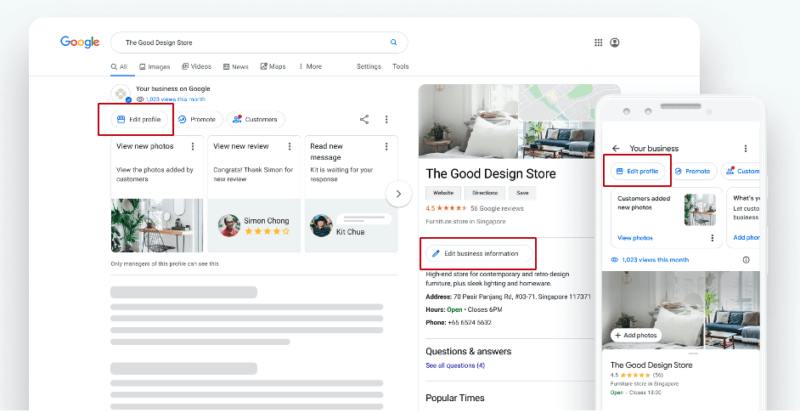
For your phone number: use the number that is answered during every listed business hour without exception.
A prospective customer who calls from your Google profile and reaches voicemail during business hours will often call the next result rather than leaving a message.
Your phone number is a conversion signal, not just a contact detail.
Your primary GBP category is the single most important ranking decision on your entire profile.
It determines which search queries you are eligible to appear for, which competitors you are ranked against, and how Google interprets every other signal on your profile in context. Getting it wrong places you in the wrong competition pool for the wrong queries.
Be specific, not broad. If you run a cosmetic dental practice, ‘Cosmetic Dentist’ outperforms the generic ‘Dentist’ for the queries where your conversion rate is highest.
If you run an Italian restaurant, ‘Italian Restaurant’ outperforms ‘Restaurant’ for the searches that bring in your actual customers. Google has over 4,000 business categories.
There is almost always a more specific option than the one most businesses default to.
Secondary categories expand your query eligibility without diluting your primary signal.
Add secondary categories for every distinct service type your business genuinely offers.
A plumber can add ‘Emergency Plumber,’ ‘Drain Cleaning Service,’ and ‘Water Heater Repair Service’ as secondary categories alongside their primary ‘Plumber’ category, creating eligibility for multiple distinct query intents simultaneously.
Use GMB Crush’s competitor audit to check the primary and secondary category configuration of your top-ranking local competitors before finalising your own.
The category data of the businesses already outranking you tells you more about what is working in your specific market than any generic recommendation can.
Recommended Reading
GBP Category Selection: the complete guide to primary vs. secondary categories and how they drive local ranking
- Step 4. Choose Relevant Attributes
After category selection, Google presents a set of attributes that describe your business in more specific detail.
The attributes available depend on your category, which is one of many reasons category selection matters so much.
Attributes appear directly on your profile in Maps and search results, and many function as filters that prospective customers use to find businesses matching their specific needs.
Configure every attribute that accurately describes your business. For service businesses, the most impactful attributes typically include: accessibility features, payment methods, appointment availability, hours nuances (like emergency availability), and any service-specific descriptors your category provides.
For healthcare businesses, attributes like ‘accepts new patients’ and insurance options are primary conversion signals.
Do not add attributes that do not accurately describe your business.
Google cross-references profile attributes against your review content and customer-submitted information.
An attribute that is contradicted by multiple customer reports creates a trust signal mismatch. GMB Crush’s audit shows which attributes your top competitors have configured that your profile is missing, giving you a specific list of additions to evaluate rather than manually reviewing every available option.
For service area businesses that travel to customers rather than receiving them at a fixed location, how you configure your geographic signals directly determines which local searches you are eligible to appear in.
This is where most SABs leave significant ranking potential uncaptured.
If your business serves customers at their location and does not have a customer-facing physical address, configure your profile as a Service Area Business by hiding your address and adding service areas by city, town, or postcode.
Hidden addresses do not hurt your ranking. An address that customers cannot visit and that generates reports as non-existent does.
Add service areas that reflect your actual operating geography accurately.
Google cross-references your listed service areas against the geographic distribution of your reviews.
A review from a customer in a town you have listed as a service area strengthens your ranking signal for that area. Reviews from towns you have not listed are a missed reinforcement opportunity.
GMB Crush’s geo-grid tracker maps your actual Map Pack ranking position across a grid of locations within your service area, showing you precisely where you rank for your target search terms and where competitors are capturing business you should be winning.
For SABs in competitive markets, this geographic ranking data is the starting point for all targeted optimisation work.
Map Your Ranking Position Across Your Entire Service Area
GMB Crush’s geo-grid shows your Map Pack position across a grid of locations in your area, pinpointing exactly where you rank and where competitors are taking business you should be winning.
Profiles with photos receive significantly more direction requests and website clicks than those without.
For any business where customers make a visual pre-visit assessment, photos are not decorative content. They are conversion infrastructure.
Upload a minimum of ten photos at launch across these types: exterior of the building or branded vehicle, interior or working environment, team photos, and product or service photos that show what customers will actually receive. Add new photos monthly.
Consistent photo activity is a Prominence signal that contributes to your Map Pack ranking in the same way that review velocity does.
Where possible, photograph using a smartphone rather than a standalone camera. Smartphone photos are automatically geo-tagged with location data that adds a geographic signal to your photo content.
This reinforces your practice address location in Google’s entity understanding in a way that location-stripped camera photos do not.
Never use stock photography. Google’s systems have improved at detecting generic stock images, and prospective customers identify them immediately. Original photos of your actual business, team, and work build the trust that stock imagery cannot replicate.
GBP Posts appear directly on your profile in Maps and search results and are one of the most consistently underused features across all profile types.
They serve two functions simultaneously: they provide prospective customers with current, action-oriented information, and they signal to Google that your profile is actively managed, which contributes to your Prominence score.
Post at minimum once per week. The content matters less than the consistency.
A business that has posted every week for six months has built a Prominence signal that a business with three recent posts cannot match quickly, regardless of the quality difference between individual posts.
The most effective post types for conversion: Offer posts with a specific monetary value or percentage (these display a badge on your Map Pack listing that increases click-through rate),
Event posts for any business-hosted activity with a specific date, and What’s New posts for service additions, team changes, or operational updates.
Every post should include a clear call to action linking directly to your booking or enquiry page, not your homepage.
Reviews are the most visible element of your local profile and the element that most directly influences both your Map Pack ranking and your conversion rate from profile view to customer contact.
Volume, velocity, and content all matter, and most businesses are managing only one of the three.
Volume establishes credibility. Below a certain count, which varies by category and market competitiveness, your profile reads as unproven regardless of your star rating.
Velocity matters as much as total count. Google weights recency in its review signals, so a steady flow of new reviews each month outperforms a large historical total that has stagnated.
Review content is indexed by Google as a keyword signal. Customers who mention your service types, your location, or specific aspects of their experience in their reviews are adding keyword relevance to your profile at no cost to you.
Prompt specific responses by being specific in your ask: ‘If you could mention the service we completed for you, that would really help us.’
Respond to every review. Responses to positive reviews are a Prominence signal and a public demonstration of engagement. Responses to negative reviews, handled professionally without confirming client information or disputing facts publicly, build trust with every prospective customer who reads your profile.
Your business description gives you 750 characters to articulate what your business does, where it operates, and why someone searching should choose you.
Most businesses either leave it incomplete or fill it with corporate language that communicates nothing useful to a prospective customer in the ten seconds they spend reading it.
Write your description in the plain language your customers use when they search for your services.
State your primary service types, your geographic coverage, and what distinguishes your business from the competitors appearing alongside you in the Map Pack. Naturally include your primary service keyword and location terms without forcing them.
The description is indexed by Google and contributes to your keyword relevance, so specificity and natural keyword inclusion matter.
Avoid promotional language that cannot be substantiated.
‘Best plumber in London’ is both unverifiable and violates Google’s profile content guidelines. ‘We provide emergency and planned plumbing services across Greater London, including boiler repair, drain clearance, and full bathroom installations’ is specific, accurate, keyword-relevant, and compliant.
Stop Optimising Without Data
GMB Crush gives you the competitor category data, review analytics, geo-grid rankings, and AI Overview insights to make every optimisation decision with evidence instead of assumptions.
The services section is the fastest available expansion of your keyword relevance and is underused by the majority of businesses.
Every service or product you add is indexed separately by Google, creating a new query eligibility window without requiring any changes to your website.
Add every service or product type your business genuinely offers, with a specific name and a short description for each.
Write descriptions in plain language that reflects how customers search for that service, not internal terminology. A plumber who adds ‘Blocked Drain Clearance,’ ‘Emergency Leak Repair,’ ‘Boiler Servicing,’ ‘Bathroom Suite Installation,’ and ‘Outdoor Tap Fitting’ as individual service entries ranks for five distinct search intents.
A plumber who lists only ‘Plumbing Services’ ranks for one.
Each service entry also supports the corresponding category signal. A service entry for ‘Teeth Whitening’ on a dental practice profile reinforces the ‘Cosmetic Dentist’ category signal. A service entry for ‘Commercial Electrical Installation’ on an electrical contractor profile reinforces the corresponding secondary category.
The compound effect of complete service coverage builds significant keyword relevance over time.
The Q&A section on your GBP profile is public and is sometimes surfaced directly in Google search results. It is also almost universally neglected.
Most businesses have unanswered customer questions sitting in their Q&A section, or no questions at all, which is a missed keyword and conversion opportunity.
Proactively add your own frequently asked questions by submitting them yourself and answering immediately.
Common questions to seed in your Q&A: your operating hours and emergency availability, your payment and insurance acceptance, your service area coverage, how to book an appointment or request a quote, and specific questions about your most common services.
Each question and answer is indexed by Google. A Q&A entry that contains natural language versions of the queries your customers search, such as ‘Do you offer same-day plumbing repairs?’ with a specific, keyword-rich answer, adds to your profile’s query relevance in a way that no other free profile field replicates as directly.
Check your Q&A section weekly. Customers can submit questions and other users can answer them, sometimes inaccurately. An incorrect answer provided by a random user is the answer a prospective customer will read unless you have provided a correct one first.
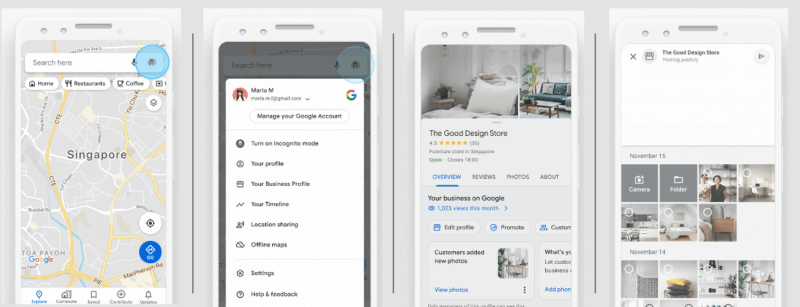
Google’s messaging feature allows customers to contact you directly through your GBP profile without calling or visiting your website.
Enabling it adds a Message button to your listing and creates a direct communication channel for prospective customers who prefer text-based contact.
The critical operational requirement: you must respond to messages within 24 hours. Google monitors response rate and speed for the messaging feature.
Profiles that consistently fail to respond to messages have the feature disabled by Google. A disabled messaging feature is both a lost conversion channel and a signal to Google that your profile is not actively managed.
Enable messaging only if your business can reliably monitor and respond to messages during business hours.
For businesses with limited capacity to manage message volume, a well-configured appointment link with a direct booking page serves the same conversion function with less operational overhead.
Your website URL on your GBP profile creates the primary structural link between your Google Business Profile and your website entity in Google’s Knowledge Graph.
This connection is how Google cross-references the claims made on your profile against the content on your website, and how the coherence between the two contributes to your overall entity signal strength.
Link to your homepage, not a specific service page. The homepage is the root of your website entity and the correct anchor for the GBP-to-website connection.
If you have multiple GBP listings for multiple locations, each listing should link to the corresponding location-specific page on your website, not all to the same homepage.
Beyond the URL, ensure your website reinforces your GBP profile at every key point. Your homepage should clearly state the same business name, address, and phone number as your GBP profile.
Each service listed in your GBP services menu should have a corresponding page on your website with substantive content about that service.
The more coherently your website mirrors and supports your GBP profile, the stronger the combined entity signal both send to Google’s local ranking system.
Incorrect business hours are the most common operational error on GBP profiles and one of the most damaging in terms of customer experience and review impact.
A customer who checks your profile, sees you are open, travels to your location or calls, and finds you unavailable will leave a negative review that accurately reflects the experience and that you cannot ethically dispute.
Audit your business hours every time they change, and use the Special Hours feature to mark bank holidays, seasonal closures, private event closures, and any deviations from your standard schedule.
Many businesses set their standard hours once and never update them for recurring exceptions. This is the most preventable source of negative reviews in any local category.
For businesses with more complex hour patterns, such as practices that offer emergency availability outside standard hours or businesses with different hours for different services, use the More Hours feature to specify additional hour types.
‘Emergency Hours,’ ‘Online Service Hours,’ and similar designations let you communicate availability nuances that a single standard hours field cannot capture, and they provide prospective customers with the specific information they need to make contact at the right time.
- GMB Crush Takeaways
Most GBP profiles are missing between three and seven of the fourteen steps above. The businesses ranking at the top of the Map Pack in your market have addressed more of them, more completely, and maintained them more consistently than their competitors. Here is how to close the gap:
- Run a GMB Crush audit against your top three competitors before making any changes: the audit shows you precisely which fields you are missing relative to the businesses already outranking you, so you are optimising the gaps that matter rather than applying effort evenly across fourteen steps.
- Fix category selection first: it is the highest-leverage single change available on any profile. If your primary category is too broad, switch to the most specific accurate option. If you have fewer than three secondary categories, add them for every distinct service you offer.
- Build review velocity into your standard workflow: four to six new reviews per month, earned through a consistent personal ask at the right moment, is a stronger ongoing ranking signal than any one-time campaign. Do this before anything else if your review profile is thin.
- Complete your services menu completely: add every service or product you offer with a specific name and description. This is the fastest available keyword expansion for any profile and requires no changes to your website.
- Run a geo-grid audit for your top three search terms: find exactly where in your service area competitors are outranking you and winning customers that should be contacting you. Target your optimisation work toward those specific geographic gaps rather than assuming your ranking is uniform across your area.
A fully optimised GBP profile is not a project you complete once.
It is a managed asset that earns a compounding return the longer it is maintained. The businesses that treat it that way consistently outperform those that optimise once and leave it. The fourteen steps above are the framework.
GMB Crush gives you the data to execute them against real competitor benchmarks in your actual market.
One Platform. Every GBP Ranking Signal.
Audit, optimise, track, and outrank. GMB Crush gives agencies and local businesses the data to dominate the Map Pack in any market. 14-day free trial, no credit card required.