

The Complete GBP Ranking Guide
f you run a service area business, the standard local SEO advice written for storefronts is going to mislead you.
A plumber, an electrician, an HVAC contractor, a cleaning service, or any other business that travels to customers rather than receiving them at a fixed address has a fundamentally different local ranking problem.
You are not trying to rank at one location. You are trying to rank across an entire territory, from a profile that may have no physical address at all.
Most SAB profiles are configured like storefront profiles with some service areas added as an afterthought.
The ones ranking consistently across their territory have treated the geographic coverage problem as the central challenge and built their profile, their website, and their review strategy around solving it deliberately.
This guide shows you exactly how.
Table of Contents
- The SAB Ranking Problem Is Different
- GBP Setup for Service Area Businesses
- Service Area Configuration That Works
- Category and Profile Optimization for SABs
- Reviews Across Your Territory
- Website Strategy for Service Area Coverage
- AI Search and SAB Visibility
- Measuring and Closing Ranking Gaps
- GMB Crush Takeaways
Storefront businesses have one primary local ranking challenge: rank for their category in the area around their address.
The address creates a strong geographic anchor that Google builds ranking signals around.
More reviews, better profile, stronger website, and the ranking improves in a relatively predictable radius around that anchor point.
Service area businesses do not have that anchor. A plumber working from a home address in the north of a city needs to rank in the south of the city too, because that is where they take jobs.
An electrician covering multiple towns needs Map Pack visibility in each of them, not just in the town where their van is parked overnight.
The fundamental challenge for any SAB is ranking across a territory, not at a point.
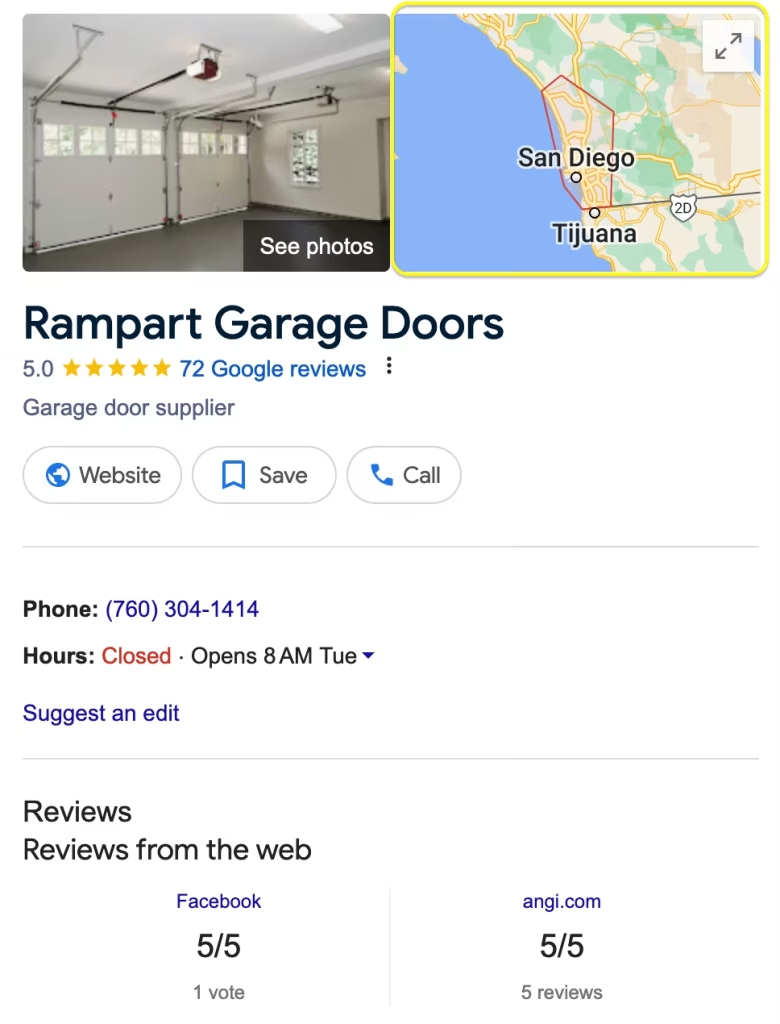
Why most SAB profiles underperform their actual reach
The most common SAB local SEO failure: the business ranks well for searches conducted near its registered address and poorly or not at all for the same search conducted from other parts of its service area.
The business owner never discovers this because they always search from their own location and see themselves ranking well.
Meanwhile, competitors are capturing enquiries from entire neighborhoods and districts that are well within the SAB’s operational coverage.
This invisible ranking gap is the problem that SAB local SEO is specifically designed to solve.
Every strategy in this guide is directed at expanding your visible ranking footprint across your full service territory, not just improving your ranking from one geographic point.
Google's three ranking signals and how they work for SABs
Google ranks local businesses on Relevance, Distance, and Prominence.
For SABs, Distance works differently than it does for storefronts. Google calculates distance from your registered address or, for businesses that have hidden their address, from the centroid of your listed service areas.
This means how you configure your service areas directly affects your Distance signal calculations across your territory.
Relevance is driven by your category configuration, your services menu, and your profile-to-website coherence. Prominence is driven by your reviews, profile completeness, and activity signals.
For SABs specifically, review geography, which is where your reviewers are located, acts as an additional distance-like signal that strengthens your ranking in the areas where your customers live.
This is a mechanism most SABs do not use deliberately, but the ones ranking consistently across their territory almost always do.
Map Your Ranking Across Your Entire Service Territory
GMB Crush’s geo-grid shows your Map Pack position at every point across your service area — not just at your registered address. Find the gaps your competitors are filling right now.
Setting up a GBP profile as a service area business requires different decisions from a storefront setup.
Getting these decisions right from the beginning prevents the category of problems that come from trying to correct a misconfigured SAB profile on a live, ranked listing.
Address: show it or hide it
This is the first structural decision for any SAB. Google’s policy requires that any address shown on a GBP profile be a location where the business is genuinely staffed during its listed hours and where customers can be received.
If you operate from a home address or a depot that customers never visit, Google’s policy is clear: you should hide your address and configure service areas instead.
Hiding your address does not hurt your ranking. This is a persistent myth that causes SABs to display addresses they should not be displaying.
What does hurt your ranking is displaying an address that customers cannot verify, that receives reports as non-existent or inaccessible, or that generates negative reviews from customers who show up at a location they cannot use.
A correctly hidden-address SAB profile competes on exactly the same terms as one with a displayed address.
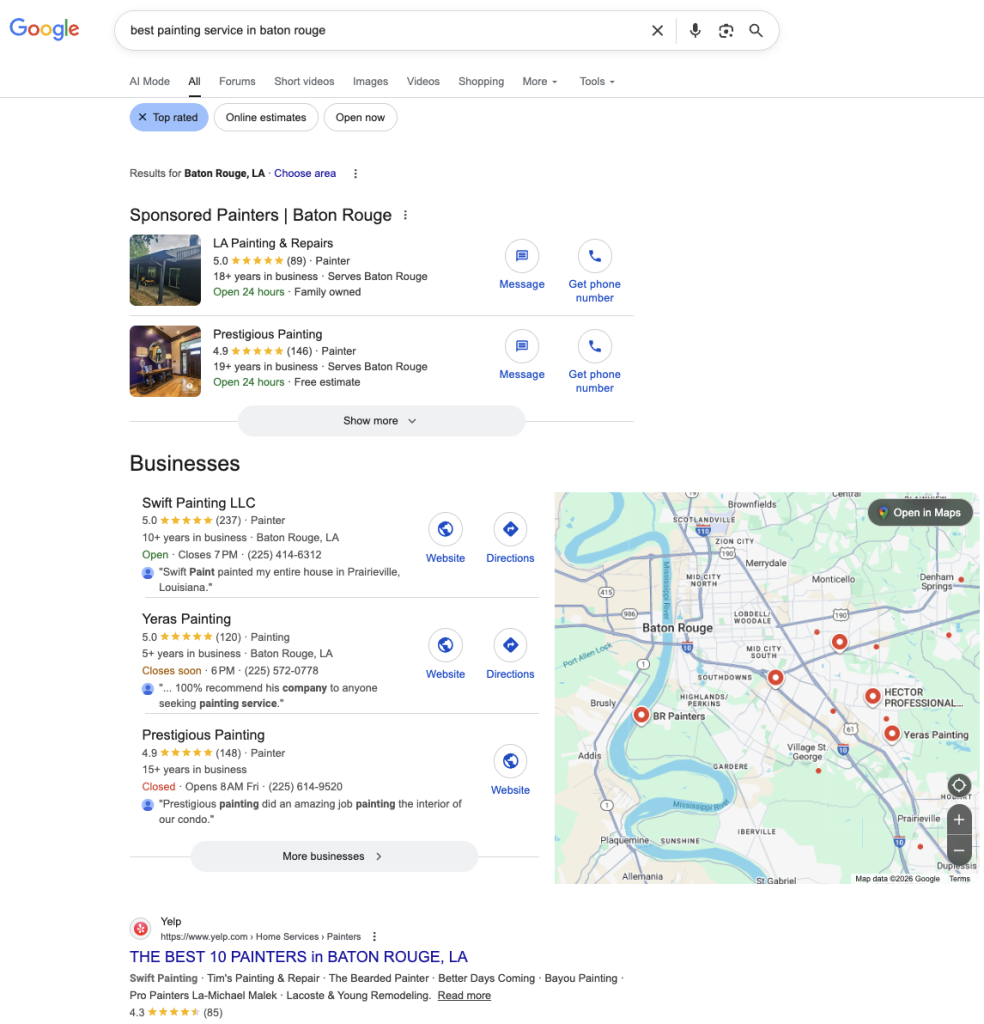
Verification for SABs
Verification confirms your business identity to Google.
For SABs that do not have a customer-facing address, video verification is the most commonly assigned method.
The video should show: your branded vehicle or equipment establishing that the business is operational, your tools or materials confirming the service type, and ideally a brief shot confirming your identity as the profile manager.
Record this during a normal working day to show an active, operating business.
Do not change your business name, primary category, or service area configuration while verification is pending.
Significant edits during the verification process can invalidate the attempt and require restarting.
Once verified, wait 48 hours before making major profile changes to avoid triggering automated review flags.
Business name: one rule for SABs
Your business name must match your real-world trading name exactly.
For SABs, the temptation to add location or service keywords to the name field is even stronger than for storefronts, because the business wants to signal the areas it covers.
This is not how the name field works, and adding keywords, locations, or service descriptors to your name is the most common cause of SAB GBP suspensions. ‘Johnson Electrical’ not ‘Johnson Electrical Services Manchester Emergency’.
Your category and service area configuration do the geographic and service signalling. Your name field is not for SEO.
- Service Area Configuration That Works
Your service area configuration is where most SABs leave the most ranking potential uncaptured.
This is the geographic layer of your profile that tells Google which local searches you are eligible to appear in beyond your registered address.
Getting it right is what allows you to rank across your territory rather than just at one point within it.
How to add service areas effectively
Google allows you to add service areas by city, town, postcode district, or county. You can add up to 20 service areas.
These are the principles that make the difference between a service area configuration that expands your ranking footprint and one that does not:
- Add every area you actually serve regularly and consistently. Not aspirationally, not occasionally. Google cross-references your listed service areas against the geographic distribution of your reviews. A listed area with no reviews from customers in that area sends a weak geographic signal.
- Be specific where search volume warrants it. Adding individual towns and neighborhoods produces stronger localised ranking signals than adding broad county or region entries that cover the same geography less specifically.
- Do not extend service areas beyond your realistic operating range. Google’s systems discount implausibly large service area configurations. A sole trader covering 150 miles in every direction from their address is not credible. A configuration that accurately reflects operational reality is.
- Revisit your service area configuration quarterly and add new areas as your business genuinely expands into them, supported by the review evidence that confirms you are actively working there.

The review geography connection
This is the mechanism that most SABs miss and that the ones ranking consistently across their territory use deliberately.
When a customer in a specific town or neighborhood leaves you a Google review, that review strengthens your ranking signal for searches conducted from that area.
The geographic distribution of your reviewers acts as a distributed Distance signal supplement that extends your ranking strength beyond what your registered address or service area configuration alone can achieve.
In practice, this means actively soliciting reviews from customers across your full service territory, not just from your nearest and most frequent customers.
A cleaning business that earns consistent reviews from customers in five different districts across a city will rank meaningfully better for searches from those districts than a competitor with the same total review count concentrated in a single area.
The key factor is this: your service area configuration tells Google where you claim to operate. Your review geography tells Google where you actually operate. The more closely these two signals align, the stronger your ranking footprint across your territory.
Recommended Reading
GBP Ranking Factors: Relevance, Distance, and Prominence explained in ful
The GBP profile optimisation principles that apply to all businesses apply to SABs, but several of them have specific implications for service area businesses that generic guides do not cover. These are the decisions that matter most for SABs specifically.
Category selection for service businesses
SABs typically operate in trade and home service categories where the category taxonomy is both specific and consequential.
A general 'Contractor' category places you in a wider, less targeted competition pool than 'Plumber' or 'Electrician.'
The most specific accurate primary category consistently outperforms the broader option for the queries that drive your highest-value jobs.
Secondary categories are where SABs have the largest untapped opportunity.
A plumber who adds 'Emergency Plumber,' 'Drain Cleaning Service,' and 'Water Heater Repair Service' as secondary categories alongside 'Plumber' as primary creates eligibility for four distinct query types across their service territory.
The same principle applies to every trade category. Add secondary categories for every service variant with its own search demand that you genuinely offer.
Services menu: your keyword coverage without a website
For SABs whose websites are thin or incomplete, the GBP services menu is the most important keyword coverage tool available.
Every service entry you add is indexed separately as a keyword signal that can rank for the corresponding query type.
An electrician who lists 'Consumer Unit Replacement,' 'EV Charger Installation,' 'Emergency Fault Finding,' 'Outdoor Lighting Installation,' and 'Smart Home Wiring' creates five distinct keyword signals that an electrician with only a business description does not have.
Write service descriptions in plain language that reflects how customers search, not trade terminology. 'Emergency boiler repair' outperforms 'Vaillant combi system fault diagnosis' for the customer searching in an unheated house at 10pm.
Match the language of the search, not the language of the trade.
Profile completeness as a competitive signal
For SABs, profile completeness carries an additional dimension of trust.
Customers who hire a service area business are letting someone into their home or workspace.
A profile that is visibly incomplete, with no photos, no service descriptions, and no recent reviews, signals a less established or trustworthy operation than a competitor whose profile is fully built out.
From real optimisation work, SABs that build complete profiles including team photos, vehicle photos, and work photos consistently convert more profile views into job enquiries than those with sparse profiles, even when the underlying service quality is equivalent.
Your Competitors Are Already Using GMB Crush
GBP audits, geo-grid ranking maps, competitor category analysis, review monitoring, and AI Overview insights. All in one platform. Start your 14-day trial today.
- Reviews Across Your Territory
Reviews are the Prominence signal that most directly separates competing SABs in the same service category and geographic market.
For service area businesses specifically, the challenge is not just building review volume. It is building reviews that reflect the full geographic scope of your operation.
The review velocity problem for SABs
SABs that operate across wide territories often have review acquisition rates that are geographically uneven.
The customers closest to the business’s home base, who are easiest to reach for follow-up, tend to be over-represented in the review profile. Customers from more distant parts of the service area are underrepresented.
The result is a review profile that signals strong local authority close to the registered address and weak or no authority in the outer areas of the service territory.
The fix is operationally straightforward but requires deliberate implementation: standardise your review request workflow so that every customer across your entire territory receives the same ask, at the same point in the job completion process, with the same direct link to your Google review page.
A text message sent within two hours of job completion, every time, to every customer, is the most effective and geographically even review acquisition approach available for SABs.

Review content and service keyword coverage
The text content of your reviews is indexed by Google and contributes to your profile’s keyword relevance across the query types your business targets.
A customer who writes ‘they unblocked our drain within the hour, fantastic emergency plumbing service’ has added ‘unblocked drain’ and ’emergency plumbing’ as indexed keyword signals on your profile at no cost.
A customer who writes ‘great job, would recommend’ has added nothing.
You cannot write the review for them, but you can shape the language. When asking for a review, mention the specific service you completed: ‘If you could mention the drain clearance work we did today, that would be really helpful.’ Customers who are given a prompt tend to include the detail.
Over dozens of reviews, this produces meaningfully richer keyword coverage than a generic ask.
Responding to reviews actively
Responding to reviews is a Prominence signal and a public demonstration to prospective customers that the business is actively managed.
For SABs where every job is a trust decision about letting someone into a customer’s property, the responsiveness shown in review management is a pre-visit trust signal that influences whether a prospective customer calls you or your competitor.
Respond to every review, every time, within 24 hours.
Your website and your GBP profile work as a combined entity signal in Google’s local ranking system.
For SABs, the website side of this equation has a specific challenge: how do you build geographic coverage signals across multiple areas without creating thin, duplicate pages that Google penalises?

Service area pages that actually work
The standard advice for SABs is to create location pages for each area you serve.
The standard execution is to create ten pages that are identical except for a swapped town name.
Google devalues thin location pages that have been built as SEO placeholders rather than as genuine local content.
The version that works requires each location page to contain substantive, area-specific content:
- The specific services you offer in that area and any relevant local context, such as common service needs in older housing stock in a particular district
- References to specific local landmarks, neighborhoods, or postcode areas that signal genuine knowledge of and presence in the area
- Customer testimonials or case references from jobs completed in that area where available
- Local contact information and response time commitments for that area
A location page built this way creates a genuine geographic relevance signal for the corresponding area.
A page that swaps one town name into a template creates a weak signal that diminishes in value as Google’s content quality evaluation improves.
Service pages as GBP entity reinforcement
Each service listed in your GBP services menu should be supported by a corresponding dedicated page on your website.
The connection between a GBP service entry and a website page with substantive content about that service creates a coherent entity signal that both elements alone cannot achieve.
An electrician with a GBP entry for ‘EV Charger Installation’ supported by a dedicated website page covering the installation process, certification requirements, compatible vehicle types, and service area coverage sends a stronger combined signal for that query than either element without the other.
- AI Search and SAB Visibility
The shift toward AI-driven local search results is having a specific and significant effect on service area businesses.
AI Overviews and the AI Pack format are changing which SABs get found for high-intent local queries, and the businesses that have built complete, structured profiles are gaining early advantages in the new format.
AI Overviews for service-based queries
Google’s AI Overviews appear increasingly for service-related informational queries: ‘how much does a boiler service cost,’ ‘what to do if your drain is blocked,’ ‘how long does an electrical rewire take,’ ‘how to find a reliable plumber.’
These summaries can surface specific local businesses as recommended service providers alongside the information, drawing from GBP profile data, review content, and website content.
SABs whose service descriptions are specific and written in plain language, and whose reviews contain natural mentions of service types and locations, are more likely to be retrieved and included in these AI-generated answers.
An AI system looking for a local drain unblocking service will retrieve profiles whose content explicitly and specifically covers drain unblocking, not just ‘plumbing services.’

The AI Pack for trade and home service searches
Current Google behaviour shows the AI Pack format appearing for high-intent local service searches, particularly those with urgency signals such as ’emergency electrician near me’ or ‘blocked drain urgent.’
In this format, Google generates a curated shortlist with AI-written business summaries drawn from GBP data.
The SABs appearing in these summaries have profile characteristics that give the AI enough structured, specific information to generate a confident summary: complete service menus, specific descriptions, recent reviews mentioning service types, and consistent post activity.
Stop Optimising Without Geographic Data
Most SABs rank well close to their address and poorly everywhere else. GMB Crush shows you exactly where you are visible and where you are invisible across your territory so you can fix the right gaps.
You cannot manage what you cannot see. For service area businesses, where the ranking problem is geographic rather than positional, the most important measurement is not your average ranking position.
It is your ranking position at specific points across your service territory.
What GBP Insights does and does not show you
Your Google Business Profile dashboard’s Insights section shows aggregate data: total profile views, total searches, total phone calls, total direction requests. This data tells you how your profile is performing in total.
It does not tell you where across your service territory those interactions are coming from, which areas are generating strong engagement, or which areas have almost no visibility at all.
Search queries in Insights are valuable for identifying which terms are driving your impressions and which are missing.
If ’emergency plumber’ drives consistent impressions but ‘boiler repair’ never appears, that is a category and services gap with jobs attached to it.
Monitor your search queries monthly and cross-reference them against your service menu entries.

The geo-grid: your territory ranking map
GMB Crush’s geo-grid tracker maps your actual Map Pack ranking position across a grid of geographic points within your service area, producing a visual map of where you rank for each of your target search terms across your full territory.
For SABs, this is the most operationally significant data available for local SEO decision-making.
In practice, what the geo-grid consistently shows for most SABs before they address the geographic ranking problem: strong ranking close to the registered address or the geographic centre of the service area, declining ranking as distance from that point increases, and often near-zero visibility in the outer districts of the claimed service territory.
The geo-grid turns this invisible problem into a visible, addressable one. Each gap on the map is a set of jobs going to a competitor who has built stronger geographic signals in that area.
Closing the gaps systematically
The geo-grid data tells you where to focus.
The tactics for closing specific geographic ranking gaps: ensure the underperforming area is listed as a service area on your GBP profile, actively request reviews from customers in that area after jobs there, create or improve the corresponding location page on your website, and configure any relevant secondary categories that might improve Relevance for the search terms performing poorly in that area.
Work the gaps in order of revenue potential. An area where you do frequent jobs but rank poorly is a higher priority than an area where you do occasional jobs and rank poorly.
The geo-grid shows the gap. Your job history tells you where the gap costs you the most.
- GMB Crush Takeaways
Service area businesses have a local SEO problem that storefront guides do not address: you are not trying to rank at one point, you are trying to rank across a territory.
Every strategy in this guide is directed at that specific challenge. Here is where to start:
- Configure your GBP profile as a true Service Area Business: if you do not have a customer-facing address, hide it and add service areas instead. If you have been displaying a home address or depot, correct this now before it generates the policy-violation reports that damage your ranking.
- Add service areas for every town, district, or postcode area you regularly serve, and ensure your review geography reflects those areas over time. The alignment between your listed service areas and where your reviewers actually live is the mechanism that builds geographic ranking strength.
- Build secondary categories for every distinct service type with its own search demand: ‘Emergency Plumber,’ ‘Drain Cleaning Service,’ ‘EV Charger Installation,’ ‘Emergency Electrician.’ Each secondary category is a new query eligibility window across your entire service territory.
- Standardise your review ask across your full territory: every customer, every job, the same workflow. Geographically even review acquisition builds geographically even ranking strength. Concentrated review acquisition builds a geographic ranking profile that mirrors your enquiry pattern, which is usually skewed toward your closest customers.
- Run a GMB Crush geo-grid audit for your top three search terms across your service territory: see exactly where you rank and where you are invisible. The gap map tells you which areas to prioritise and which optimisations to apply to close those specific gaps rather than working blindly across a territory you cannot see.
The service area businesses consistently winning local search in every market are not the ones with the most marketing spend.
They are the ones that have solved the geographic ranking problem deliberately.
They know where they rank, they know where they do not, and they use that data to close the gaps before competitors can widen them.
The geo-grid is where that work starts.
One Platform. Every Local Ranking Signal.
Audit, optimise, track, and outrank across your full service territory. GMB Crush gives service area businesses and the agencies managing them the data to dominate local search.