
The Behavioral Signal Most Businesses Ignore
Most local businesses track their Google Maps phone calls and website clicks because those metrics connect obviously to revenue.
Direction requests sit in the same GBP Insights dashboard, and most businesses glance past them as a secondary metric.
That is a mistake. Direction requests are one of the strongest behavioral signals Google uses to evaluate your business’s Prominence, and they are the metric most directly correlated with actual physical visits to your location.
Understanding how direction requests work as a ranking signal, what drives them, and how to generate more of them organically gives you a lever on your Map Pack ranking that most competitors are not pulling. This guide covers all three.
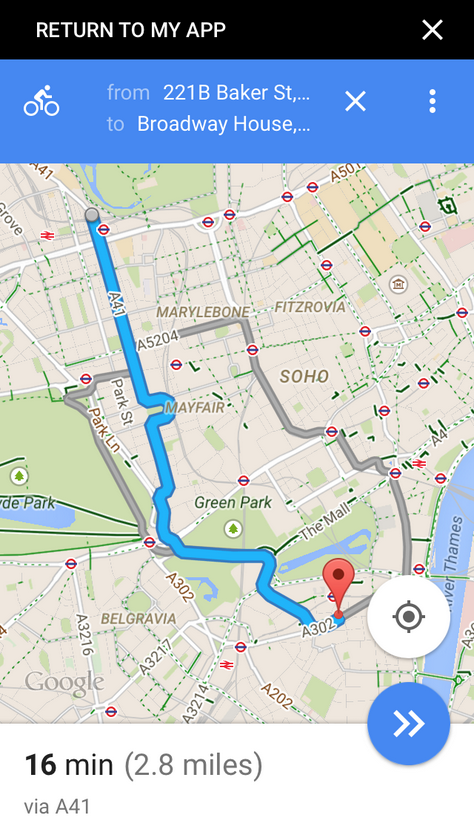
When someone clicks the Directions button on your Google Business Profile, Google records that interaction.
Aggregated across many users over time, direction requests tell Google something that reviews, photos, and profile completeness alone cannot tell it: that real people, at real locations, are actively choosing to navigate to your business.
That is a strong signal of genuine demand.
Google’s local ranking algorithm weights Prominence heavily the third of its three core ranking signals after Relevance and Distance.
Prominence is not a single metric. It is an aggregate of signals that tell Google how well-known, well-used, and well-regarded a business is in its local area.
Behavioral signals, including direction requests, phone calls, and website clicks from your GBP profile, contribute to that Prominence evaluation.
Why direction requests carry more weight than clicks
A website click tells Google that someone found your profile relevant enough to explore further.
A phone call tells Google that someone was interested enough to initiate contact.
A direction request tells Google that someone was committed enough to navigate physically to your location.
The intent level embedded in each signal is progressively higher, and Google’s systems weight signals proportionally to the intent they represent.
For brick-and-mortar businesses restaurants, retail shops, dental practices, salons, gyms, medical clinics direction requests are among the clearest available signals of real consumer intent.
A business receiving consistent direction requests from a wide range of searcher locations is demonstrating to Google that it genuinely serves its local community, not just that it has a well-optimised profile.
The correlation between direction requests and review volume
Businesses with strong direction request rates consistently show strong review profiles.
This is not a coincidence. The customers who navigate to your location and have a positive experience are the same pool of people most likely to leave a review when asked.
Direction requests are therefore both a direct ranking signal in themselves and a leading indicator of your review acquisition potential.
A business that is generating high direction request volume but not capturing reviews from those visitors is leaving a compounding Prominence benefit uncollected.
Map Your Ranking Position Across Your Entire Service Area
GMB Crush’s geo-grid shows your Map Pack position across a grid of locations in your area. Find the ranking gaps that are sending your potential customers to competitors.
To understand where direction requests fit in your GBP performance picture, it helps to understand how they compare to the other behavioral metrics Google tracks in your Insights data.
Each metric captures a different stage of customer intent and contributes differently to your overall engagement signal.
The GBP behavioral signal hierarchy
Profile views are the broadest signal a count of how many times your listing appeared in search results and was seen, regardless of whether any action followed.
Views are volume, not intent. They tell you about your visibility, not your appeal.
Website clicks are the first action signal a customer saw your profile and decided to learn more. This indicates moderate intent.
The customer is researching but has not yet committed to visiting or contacting.
Phone calls from profile represent direct intent the customer has seen your profile, formed a positive enough impression to make contact, and chosen phone as their channel.
For most service businesses, this is the primary conversion action.
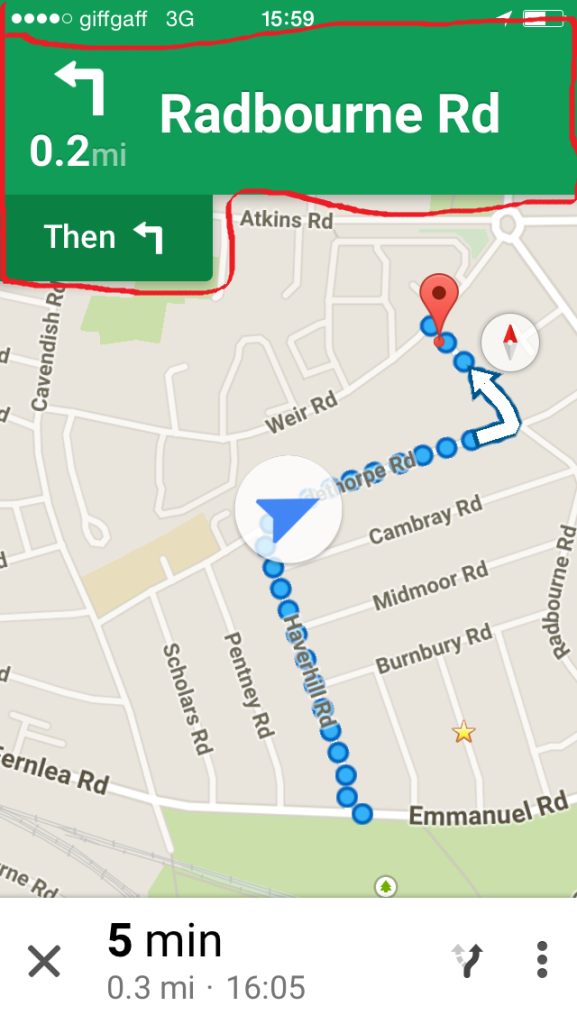
Direction requests represent physical commitment intent the customer has decided they want to visit your location and is actively preparing to do so.
For brick-and-mortar businesses, this is the behavioral signal most directly correlated with revenue-generating visits.
What your direction-to-view ratio tells you
Dividing your direction requests by your profile views gives you a direction conversion rate what percentage of people who see your profile are motivated enough to navigate to you.
A low direction conversion rate despite reasonable profile views indicates either that your profile is not convincing customers of the value of a visit, or that your business type does not naturally generate direction requests (service area businesses and e-commerce, for example, would naturally have lower direction rates than restaurants or retail shops).
Tracking this ratio over time is more useful than tracking the raw direction request number, because it controls for the natural variation in profile view volume and gives you a cleaner signal of whether your profile is improving its ability to convert viewers into visitors.
- What Drives Direction Request Volume
Direction requests are downstream of profile quality and Map Pack visibility.
You cannot manufacture direction requests directly, but you can build the profile and ranking conditions that produce them as a natural consequence.
These are the optimisation decisions that most directly influence your direction request volume.
Map Pack position is the primary driver
The vast majority of direction requests come from customers who found your business through a Map Pack result, not through a direct search for your business name.
If your profile is not appearing in the Map Pack for your primary local search terms, you are invisible to the search-driven customers who generate direction requests.
Map Pack position is therefore the prerequisite for direction request volume improving your ranking produces direction request growth as a direct consequence.
The ranking signals that most directly move your Map Pack position precise primary category, secondary category stack, review velocity, profile completeness, and GBP post activity are the same signals that drive direction request volume.
There is no separate direction-request-specific strategy. There is only building a profile Google ranks well, and the direction requests follow from the visibility.
Profile completeness and visual appeal
Direction requests require a specific decision from the customer: not just to note your existence but to commit to visiting.
That decision is most often made when the customer is reassured by what they see on your profile.
The elements that most directly build that reassurance:
- Complete and accurate address with a correctly placed pin on Google Maps. Customers who cannot clearly identify exactly where your business is located will call rather than navigate, or move to a competitor whose location is clearer.
- Quality photos that show your exterior, your entrance, and any parking or access information. A customer who knows what to look for when they arrive is more likely to request directions than one who is uncertain whether they can find you.
- Business hours that are accurate and current. A customer who is not sure whether your business is open when they plan to arrive will not request directions.
- Review content that mentions the physical location positively. Reviews that say ‘easy to find,’ ‘great parking,’ or ‘exactly where Google Maps says it is’ provide the geographic reassurance that drives direction requests.
Category precision and search relevance
Direction requests come predominantly from customers who found you while searching for your category of business in your area.
The more precisely your primary category matches the query type that brings customers to your profile, the higher the intent level of those customers and the higher the proportion who will proceed to request directions.
A cosmetic dental practice that uses ‘Cosmetic Dentist’ as its primary category is receiving profile views from customers already looking for cosmetic dentistry.
A higher proportion of those visitors will be motivated to request directions than those landing on a generic ‘Dentist’ profile from a broader query.
Your Competitors Are Already Using GMB Crus
GBP audits, geo-grid ranking maps, competitor analysis, review monitoring, and AI Overview insights. All in one platform. Start your 14-day trial today.
Beyond the organic direction requests generated by Map Pack visibility, you can actively distribute your Google Maps direction link through your marketing touchpoints to generate direction requests from customers who already know about your business.
Each of these requests contributes to your behavioral signal in the same way that a request initiated from a search does.
How to create your Google Maps direction link
Your Google Maps direction link takes customers directly to the navigation interface for your specific business address. To create it:
- Search your business name in Google Maps until your GBP profile pin appears.
- Click the Directions button on your profile.
- Copy the URL from your browser address bar. This URL contains your business location as the destination in the Google Maps navigation interface.
- Use this URL wherever you want to prompt customers to navigate to your location.
The resulting link, when clicked, opens Google Maps with your business as the destination and prompts the user to enter their starting point. Each interaction contributes a direction request to your Insights data.
Where to embed your direction link
- Email signatures: add a ‘Get Directions’ link to every team member’s email signature. Customers who receive confirmations, quotes, or follow-up emails have direct access to navigation without needing to search.
- Appointment confirmation messages: when you confirm a booking via text, email, or your booking system, include a ‘Get Directions’ link. This is the highest-intent moment for a customer to request directions.
- Website contact and location page: a prominent ‘Get Directions’ button on your contact page converts a customer who has reached your website back into a GBP direction request.
- Social media profiles: include your direction link in your bio or about section on any social platform where customers might look for your location.
- Physical marketing materials: a QR code linking to your direction link on business cards, flyers, or your shop window lets offline touchpoints generate GBP behavioral signals.
This directly impacts your Prominence score: every direction request generated through your distributed links counts in Google’s behavioral signal evaluation identically to an organically generated direction request from a search result. The source of the request does not change its value as a signal.
- Location Pages and Direction Request Depth
For businesses with multiple locations, or for businesses whose customers arrive from specific surrounding areas, building location-specific content on your website creates an additional source of direction requests from organic search traffic beyond your GBP profile.
Location pages that generate direction requests
A well-built location page for a specific neighborhood, district, or surrounding town serves customers who are researching before they commit to a visit.
When that page includes a Google Maps embed for your location and a clear direction link, customers who arrive at the page through organic search are converted into GBP direction requests rather than simply reading the page and leaving.
The location pages that generate the most direction requests have three things in common: they are genuinely specific to the area they target rather than thin templates, they contain a Google Maps embed with your business pin and a working direction link, and they clearly state the relevant information for a customer deciding whether to visit distance from their area, parking information, public transport access, and what to expect when they arrive.
Embedded maps and the direction request loop
An embedded Google Maps widget on your website, when interacted with by a visitor, generates engagement with your business entity in Google’s systems. Visitors who click through from the embedded map to Google Maps and proceed to request directions create a behavioral signal chain that connects organic website traffic to GBP engagement.
This loop organic search leads to location page, location page leads to map interaction, map interaction leads to direction request is one of the most efficient direction request generation mechanisms available for businesses that have location-specific content on their website.
Direction requests are most valuable as a performance metric when tracked consistently over time and benchmarked against your profile’s overall performance picture.
Treating them as a standalone number without context produces misleading conclusions.
These are the measurement practices that make direction request data actionable.
Tracking direction requests in GBP Insights
Inside your Google Business Profile dashboard, the Insights section shows your direction request count over a selected time period. Track this monthly at minimum.
The metric to watch is not the raw number but the month-over-month trend. A consistent upward trend following profile optimisation confirms the connection between your optimisation work and physical visitor intent.
A flat or declining trend despite growing profile views suggests a conversion problem customers are finding your profile but not being convinced to visit.
Cross-reference your direction requests against your phone calls and website clicks each month.
A profile that is generating high phone call volume but low direction requests is likely attracting service-focused customers who call to book rather than walk in this is normal for service businesses.
A retail or hospitality profile showing high views but low direction requests has a profile-quality problem worth investigating.
What your direction request trend reveals about your ranking
Direction requests are a leading indicator of your Map Pack ranking trajectory.
When your direction request volume grows consistently month over month, it means more customers are finding your profile through search and being motivated to visit.
This confirms that your Map Pack visibility is improving and that your profile is performing its conversion function effectively.
When direction requests plateau or decline despite consistent review activity, it often indicates a ranking position loss in specific geographic areas or for specific query types the profile is still active but fewer customers are finding it through search.
GMB Crush’s geo-grid tracker maps your Map Pack ranking position across your full area, showing you the geographic dimension of your ranking performance that Insights cannot provide.
When direction requests decline, the geo-grid tells you which specific areas your visibility has dropped in, turning a vague performance problem into a targetable ranking gap.
Audit Your GBP Against the Top 3 in Your Market
GMB Crush compares your profile against the businesses ranking above you and shows you the exact optimisation gaps driving the difference. Fix the right things first.
Recommended Reading
GBP Ranking Factors: Relevance, Distance, and Prominence the three signals that determine your Map Pack position
- GMB Crush Takeaways
Direction requests are the behavioral signal that most directly connects your Google Maps presence to real customer visits and revenue for brick-and-mortar businesses.
Most businesses track them passively without understanding what drives them or how to influence them.
Here is what to act on:
- Improve your Map Pack position first: direction requests come predominantly from Map Pack search results. Category precision, review velocity, profile completeness, and GBP post activity are the ranking levers that produce direction request growth as a direct consequence.
- Verify your map pin placement and address accuracy: a misplaced pin or an ambiguous address entry is one of the most common barriers to direction requests. Customers who cannot clearly identify where you are will not navigate to you. Check your pin placement in Google Maps from a customer’s perspective and correct any inaccuracies.
- Create and distribute your Google Maps direction link: embed it in your email signature, appointment confirmations, website contact page, and social profiles. Every direction request generated through these touchpoints contributes to your behavioral signal in the same way as an organically generated request.
- Track your monthly direction request trend alongside your phone calls and website clicks: the ratio of these three metrics tells you whether your profile is converting visibility into the type of customer action that matches your business model.
- Run a GMB Crush geo-grid audit when direction requests plateau or decline: the geo-grid shows you where your Map Pack visibility has changed, turning an unexplained performance drop into a specific ranking gap you can address.
Direction requests are not a metric to optimise for directly.
They are a consequence of doing the underlying work well ranking in the Map Pack for your primary search terms, presenting a complete and convincing profile, and making it easy for customers to navigate to you at every touchpoint.
The businesses generating the most direction requests are not running direction request campaigns. They are running the best GBP profiles in their market.
One Platform. Every Local Ranking Signal.
Audit, optimise, track, and outrank. GMB Crush gives local businesses and agencies the data to build the engagement signals and profile strength that drive consistent Map Pack rankings. 14-day trial, no credit card required.